Home›Gym & Fitness Software›FitForge - Gym & Fitness Studio Manageme…Admin Dashboards
About This Product
Managing a gym involves more than keeping the equipment in good shape. You also need to track memberships, record attendance, manage trainers, schedule classes, collect payments, and stay in touch with members. Handling everything manually can quickly become time-consuming as your gym grows.
FitForge brings these everyday tasks together in one platform. It includes a Django REST API backend, a Next.js web dashboard for gym owners and staff, and a Flutter mobile app for members. Whether you are running a single fitness studio or planning to build your own fitness software business, FitForge gives you a starting point you can customize to suit your needs.
You get the source code, can deploy the platform on your own server, and can adapt its branding and features for your business.
How FitForge Works
1. Manage Your Gym from the Web Dashboard
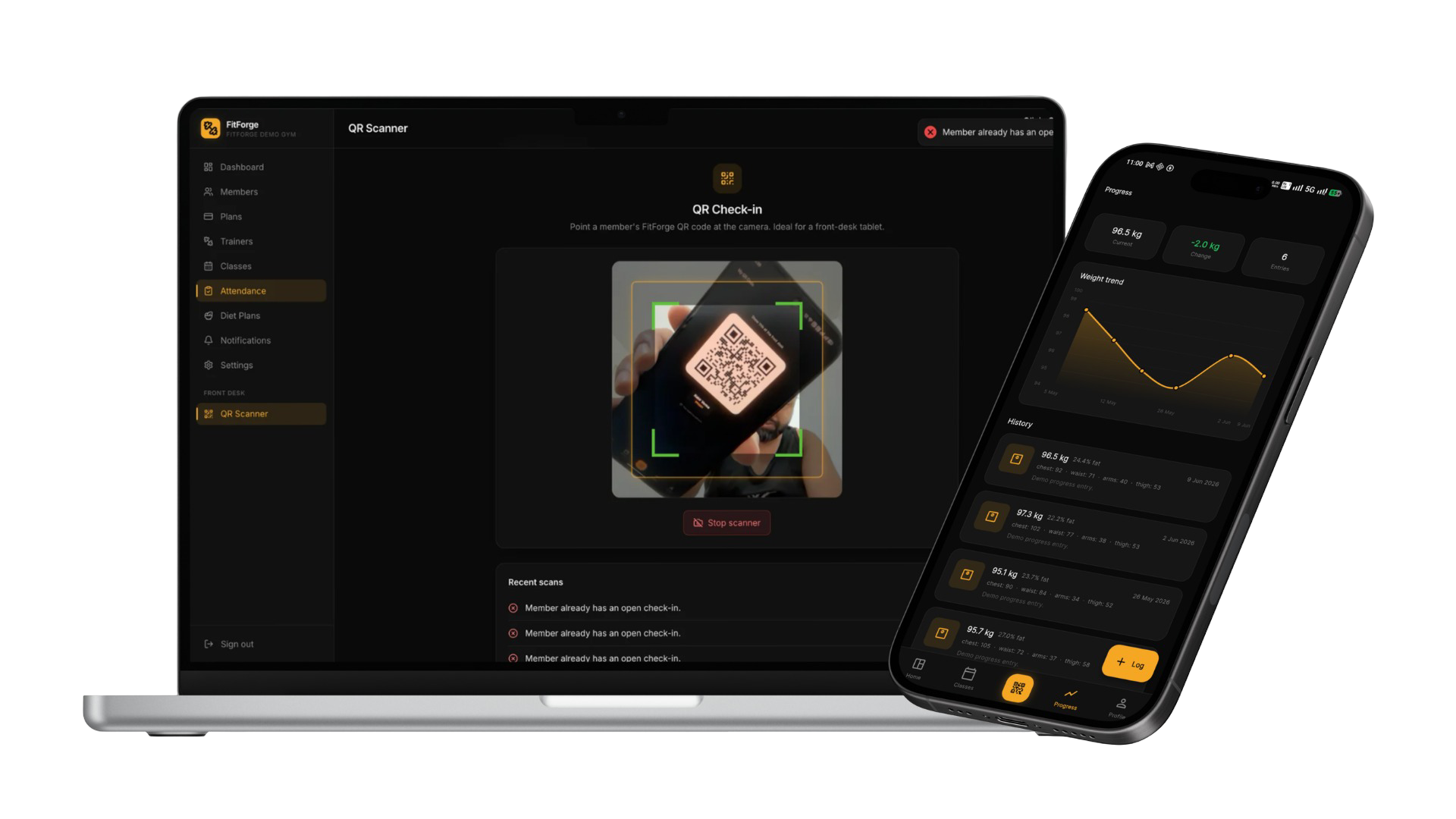
The web dashboard gives owners and staff a central place to manage daily gym operations. You can create membership plans, manage member accounts, review attendance, monitor upcoming renewals, assign diet plans, and keep track of classes.
Access is based on user roles, so everyone can focus on their responsibilities. Owners have access to gym management features, trainers can work with their assigned members and schedules, and staff can handle routine tasks without needing access to every administrative setting.
2. Give Members a Dedicated Mobile App
FitForge includes a Flutter mobile app for Android and iOS. Members can use it to check their membership status, view attendance history, browse class schedules, and access their assigned diet plans.
They can also book or cancel classes, renew memberships through Razorpay, access their personal QR code for gym check-ins, and record progress measurements such as weight and body fat. Progress charts help them review changes over time.
The app uses Riverpod for state management and features an Obsidian Gold design, combining dark backgrounds with gold accents for a consistent, modern look.
3. Handle Membership Payments in One Place
FitForge integrates with Razorpay to support membership payments and renewals. Members can initiate renewals from the mobile app, while authorized staff can process them through the web dashboard.
Test mode and mock payment mode are also available. This makes it easier to demonstrate the platform, test payment flows, and develop locally before configuring live payment credentials.
Features Included in FitForge
The platform covers the main tasks involved in managing a gym, from enrolling members to tracking attendance and following up on membership renewals.
Membership and User Management
- JWT-based authentication with phone or email login.
- Role-based access for owners, staff, trainers, and members.
- Membership plans with configurable prices, durations, and features.
- Member profiles and membership status tracking.
- Alerts for memberships that are approaching their expiry date.
Attendance and Class Scheduling
- QR code scanning through the web dashboard for member check-ins.
- Manual attendance check-in and check-out.
- Attendance records and detailed reports.
- Weekly class schedules.
- Class booking and cancellation through the member app.
Payments and Notifications
- Razorpay integration for membership payments and renewals.
- Test and mock payment modes for development and demonstrations.
- WhatsApp notification dispatch for renewal reminders and broadcasts.
- Dashboard alerts to help staff follow up on expiring memberships.
Trainer, Diet, and Progress Management
- Trainer profiles and assigned member lists.
- Class scheduling and member progress views for trainers.
- Individual diet plans that members can access on their phones.
- Progress logs for weight, body fat, and photos.
- Charts for reviewing recorded progress over time.
Dashboard and Development Features
- Dashboard statistics, charts, and activity summaries.
- Demo seed data for members, trainers, plans, and transactions.
- Multi-tenant-lite architecture with gym-scoped data queries.
- SQLite3 support for local development, with PostgreSQL as a production option.
Who Can Use FitForge?
Gym Owners and Fitness Studio Managers
If you manage a gym, CrossFit box, yoga studio, or boutique fitness centre, FitForge can help bring membership records, attendance, payments, and class schedules into one system.
You can host the software on your own infrastructure and adapt it to your business processes. Owning the source code also gives you more control over future changes compared with relying entirely on a subscription-based platform.
Fitness Technology Startups
Building a fitness management product from scratch means spending time on authentication, APIs, dashboards, mobile screens, payment integration, and other core features before you can focus on your own product idea.
FitForge gives you an existing codebase to build on. You can customize its appearance, extend its functionality, and shape it into a product that fits your target market.
Software Development Agencies
Agencies working with gyms and fitness businesses can use FitForge as a foundation for client projects instead of developing every common feature from the beginning. Depending on the client's requirements, the existing platform can be branded, configured, and extended before delivery.
Need help adapting the product to a client's requirements? Explore CodeAj Startup's customization and white-labeling service .
SaaS Founders and Multi-Location Businesses
FitForge includes a multi-tenant-lite approach that scopes queries to the authenticated gym. This provides a starting point for businesses that want to explore a multi-location or SaaS model.
However, supporting multiple independent customers in a production SaaS environment may require additional work, including tenant isolation, permissions, billing, onboarding, and security testing. Those requirements should be reviewed before launching a shared multi-tenant deployment.
Practical Ways to Use FitForge
For a Single Gym
A gym can use FitForge to replace scattered spreadsheets and manual attendance registers with a central system. Staff can record check-ins, review membership expiry dates, and manage renewals from the dashboard, while members use the mobile app to access their own information.
For a Fitness Business with Multiple Locations
A business with several branches could deploy separate instances for individual locations, giving each branch its own operational environment. This approach requires appropriate server configuration, backup procedures, and access controls for every instance.
For a Fitness Startup
A startup can customize the existing dashboard and mobile app, introduce its own branding, and add features that distinguish its service. This can reduce the amount of foundational development required before testing the product with potential customers.
For an Agency Building a Custom Solution
An agency can adapt FitForge to a client's workflow, whether that means changing the dashboard design, extending reporting, or modifying how bookings and attendance are handled. The final development effort will depend on how closely the client's needs match the existing features.
Why Start with FitForge Instead of Building from Scratch?
A gym management platform involves several connected parts: authentication, role permissions, membership management, payment processing, attendance, class bookings, a web dashboard, and a mobile application. Building and testing all of these components takes considerable development time.
FitForge gives you an existing implementation of these core workflows, so you can spend more time adapting the product to your requirements rather than starting with an empty project.
The actual time and cost savings will depend on your team, deployment environment, and the changes you need. You should also account for testing, maintenance, hosting, payment gateway charges, and any third-party messaging costs when planning your budget.
If your business needs additional functionality, such as a customized billing process, new user roles, or specialized reports, you can build on the existing codebase. Contact CodeAj Startup for customization services to discuss your requirements.
What You Receive When You Buy FitForge
Your purchase includes the source code and supporting files needed to explore, configure, and deploy the platform.
- Django REST backend: Source code covering the application apps, models, serializers, views, and URL configurations.
- Next.js web dashboard: Next.js 14 App Router frontend using JSX and Tailwind CSS, including the dashboard pages.
- Flutter mobile application: App source code with Riverpod state management and the Razorpay integration.
- Database and migrations: SQLite3 configuration for local development and migration files, with PostgreSQL available as a production database option.
- Demo data: A seed script to populate a sample gym environment with members, trainers, membership plans, and transactions.
- Environment templates: Configuration templates for the backend, frontend, and mobile app.
- Deployment documentation: Guidance covering VPS setup, Nginx, Gunicorn, systemd, SSL, and domain configuration.
- Project documentation: Backend and frontend README files with API references and route documentation.
- Optional developer onboarding: Ask about an onboarding session through CodeAj Startup's contact page .
Get Started with FitForge
FitForge is available through the CodeAj Startup marketplace . It is designed for developers, founders, agencies, and fitness businesses that want a source-code foundation for a gym management product.
Review the included features, check the deployment requirements, and decide which customizations your business needs. You can then use the codebase to build a solution that reflects your own brand and workflow.
Whether you are streamlining one gym's daily operations or exploring a fitness software business, FitForge gives you a practical starting point for your next project.
FitForge - Gym & Fitness Studio Management Platform
A full-stack gym management SaaS with a web admin dashboard and a Flutter member app. Ready for real gym owners to run on day one.
What's Included
Extra Add-Ons
Professional upgrades to save time and launch faster.
About This Product
Managing a gym involves more than keeping the equipment in good shape. You also need to track memberships, record attendance, manage trainers, schedule classes, collect payments, and stay in touch with members. Handling everything manually can quickly become time-consuming as your gym grows.
FitForge brings these everyday tasks together in one platform. It includes a Django REST API backend, a Next.js web dashboard for gym owners and staff, and a Flutter mobile app for members. Whether you are running a single fitness studio or planning to build your own fitness software business, FitForge gives you a starting point you can customize to suit your needs.
You get the source code, can deploy the platform on your own server, and can adapt its branding and features for your business.
How FitForge Works
1. Manage Your Gym from the Web Dashboard
The web dashboard gives owners and staff a central place to manage daily gym operations. You can create membership plans, manage member accounts, review attendance, monitor upcoming renewals, assign diet plans, and keep track of classes.
Access is based on user roles, so everyone can focus on their responsibilities. Owners have access to gym management features, trainers can work with their assigned members and schedules, and staff can handle routine tasks without needing access to every administrative setting.
2. Give Members a Dedicated Mobile App
FitForge includes a Flutter mobile app for Android and iOS. Members can use it to check their membership status, view attendance history, browse class schedules, and access their assigned diet plans.
They can also book or cancel classes, renew memberships through Razorpay, access their personal QR code for gym check-ins, and record progress measurements such as weight and body fat. Progress charts help them review changes over time.
The app uses Riverpod for state management and features an Obsidian Gold design, combining dark backgrounds with gold accents for a consistent, modern look.
3. Handle Membership Payments in One Place
FitForge integrates with Razorpay to support membership payments and renewals. Members can initiate renewals from the mobile app, while authorized staff can process them through the web dashboard.
Test mode and mock payment mode are also available. This makes it easier to demonstrate the platform, test payment flows, and develop locally before configuring live payment credentials.
Features Included in FitForge
The platform covers the main tasks involved in managing a gym, from enrolling members to tracking attendance and following up on membership renewals.
Membership and User Management
- JWT-based authentication with phone or email login.
- Role-based access for owners, staff, trainers, and members.
- Membership plans with configurable prices, durations, and features.
- Member profiles and membership status tracking.
- Alerts for memberships that are approaching their expiry date.
Attendance and Class Scheduling
- QR code scanning through the web dashboard for member check-ins.
- Manual attendance check-in and check-out.
- Attendance records and detailed reports.
- Weekly class schedules.
- Class booking and cancellation through the member app.
Payments and Notifications
- Razorpay integration for membership payments and renewals.
- Test and mock payment modes for development and demonstrations.
- WhatsApp notification dispatch for renewal reminders and broadcasts.
- Dashboard alerts to help staff follow up on expiring memberships.
Trainer, Diet, and Progress Management
- Trainer profiles and assigned member lists.
- Class scheduling and member progress views for trainers.
- Individual diet plans that members can access on their phones.
- Progress logs for weight, body fat, and photos.
- Charts for reviewing recorded progress over time.
Dashboard and Development Features
- Dashboard statistics, charts, and activity summaries.
- Demo seed data for members, trainers, plans, and transactions.
- Multi-tenant-lite architecture with gym-scoped data queries.
- SQLite3 support for local development, with PostgreSQL as a production option.
Who Can Use FitForge?
Gym Owners and Fitness Studio Managers
If you manage a gym, CrossFit box, yoga studio, or boutique fitness centre, FitForge can help bring membership records, attendance, payments, and class schedules into one system.
You can host the software on your own infrastructure and adapt it to your business processes. Owning the source code also gives you more control over future changes compared with relying entirely on a subscription-based platform.
Fitness Technology Startups
Building a fitness management product from scratch means spending time on authentication, APIs, dashboards, mobile screens, payment integration, and other core features before you can focus on your own product idea.
FitForge gives you an existing codebase to build on. You can customize its appearance, extend its functionality, and shape it into a product that fits your target market.
Software Development Agencies
Agencies working with gyms and fitness businesses can use FitForge as a foundation for client projects instead of developing every common feature from the beginning. Depending on the client's requirements, the existing platform can be branded, configured, and extended before delivery.
Need help adapting the product to a client's requirements? Explore CodeAj Startup's customization and white-labeling service .
SaaS Founders and Multi-Location Businesses
FitForge includes a multi-tenant-lite approach that scopes queries to the authenticated gym. This provides a starting point for businesses that want to explore a multi-location or SaaS model.
However, supporting multiple independent customers in a production SaaS environment may require additional work, including tenant isolation, permissions, billing, onboarding, and security testing. Those requirements should be reviewed before launching a shared multi-tenant deployment.
Practical Ways to Use FitForge
For a Single Gym
A gym can use FitForge to replace scattered spreadsheets and manual attendance registers with a central system. Staff can record check-ins, review membership expiry dates, and manage renewals from the dashboard, while members use the mobile app to access their own information.
For a Fitness Business with Multiple Locations
A business with several branches could deploy separate instances for individual locations, giving each branch its own operational environment. This approach requires appropriate server configuration, backup procedures, and access controls for every instance.
For a Fitness Startup
A startup can customize the existing dashboard and mobile app, introduce its own branding, and add features that distinguish its service. This can reduce the amount of foundational development required before testing the product with potential customers.
For an Agency Building a Custom Solution
An agency can adapt FitForge to a client's workflow, whether that means changing the dashboard design, extending reporting, or modifying how bookings and attendance are handled. The final development effort will depend on how closely the client's needs match the existing features.
Why Start with FitForge Instead of Building from Scratch?
A gym management platform involves several connected parts: authentication, role permissions, membership management, payment processing, attendance, class bookings, a web dashboard, and a mobile application. Building and testing all of these components takes considerable development time.
FitForge gives you an existing implementation of these core workflows, so you can spend more time adapting the product to your requirements rather than starting with an empty project.
The actual time and cost savings will depend on your team, deployment environment, and the changes you need. You should also account for testing, maintenance, hosting, payment gateway charges, and any third-party messaging costs when planning your budget.
If your business needs additional functionality, such as a customized billing process, new user roles, or specialized reports, you can build on the existing codebase. Contact CodeAj Startup for customization services to discuss your requirements.
What You Receive When You Buy FitForge
Your purchase includes the source code and supporting files needed to explore, configure, and deploy the platform.
- Django REST backend: Source code covering the application apps, models, serializers, views, and URL configurations.
- Next.js web dashboard: Next.js 14 App Router frontend using JSX and Tailwind CSS, including the dashboard pages.
- Flutter mobile application: App source code with Riverpod state management and the Razorpay integration.
- Database and migrations: SQLite3 configuration for local development and migration files, with PostgreSQL available as a production database option.
- Demo data: A seed script to populate a sample gym environment with members, trainers, membership plans, and transactions.
- Environment templates: Configuration templates for the backend, frontend, and mobile app.
- Deployment documentation: Guidance covering VPS setup, Nginx, Gunicorn, systemd, SSL, and domain configuration.
- Project documentation: Backend and frontend README files with API references and route documentation.
- Optional developer onboarding: Ask about an onboarding session through CodeAj Startup's contact page .
Get Started with FitForge
FitForge is available through the CodeAj Startup marketplace . It is designed for developers, founders, agencies, and fitness businesses that want a source-code foundation for a gym management product.
Review the included features, check the deployment requirements, and decide which customizations your business needs. You can then use the codebase to build a solution that reflects your own brand and workflow.
Whether you are streamlining one gym's daily operations or exploring a fitness software business, FitForge gives you a practical starting point for your next project.
Part of our Gym & Fitness Software category
See everything built for this industry.
Related Products
More Admin Dashboards products you might find useful.